Riven Backend Configuration
Riven collects media from your chosen lists and requests, then organizes it for your media server. DUMB starts the supporting services; Riven Frontend is where you choose accounts, sources, scrapers and library behavior.
Initial Setup: Riven Backend
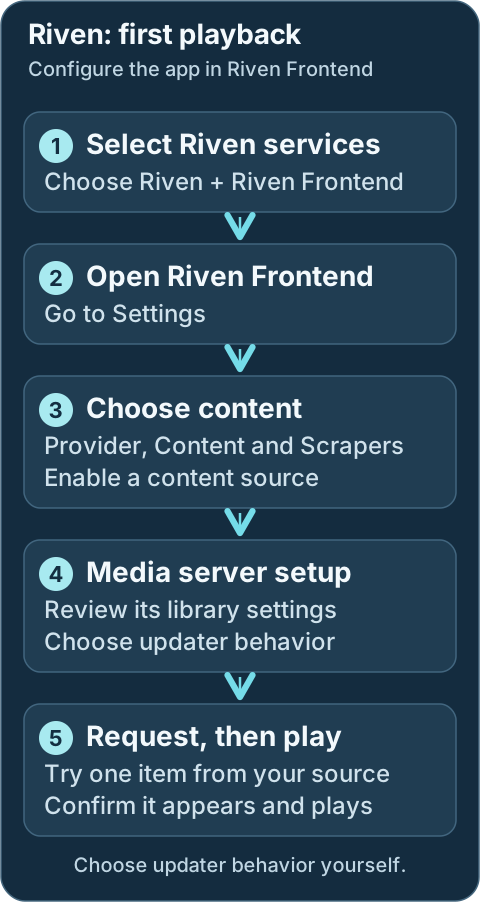
- Select Riven Backend and Riven Frontend in DUMB onboarding, along with your provider and media server. Reopen onboarding from Settings → Launch Onboarding when needed.
- Open the Riven Backend service card and check that it is running. Use DUMB Config → Start if stopped and wait for its supporting services to become ready.
- Open the Riven Frontend service card, start it if needed, then select Embedded UI → Settings.
- Configure your provider account and library paths. Enable at least one Content source so Riven knows what to collect, and at least one suitable Scraper so it can find sources. Review Ranking before importing a large list.
- Under Media Server, review the connection to Plex, Jellyfin or Emby and deliberately choose whether its updater should run. Saving a connection alone does not enable that updater.
- Add one intended request through the source you enabled. Follow its progress in Riven, check the media-server library, and play the result before enabling broad acquisition.
Required configuration
Installing Riven is only the first step. An account, usable content source, scraper and matching library paths are needed for a working collection workflow.
Recommended Setup Areas
- General – Adjust base settings like min/max files size, etc.
- Media Server – Review your Plex, Jellyfin, or Emby connection, then choose whether its updater should run.
- Content – Configure sources such as Trakt, Seerr, or the Plex Watchlist, MDB List, Listrr.
- Scrapers – Enable one or more scrapers (e.g., Zilean, Torrentio, Knightcrawler, Orionoid, Jackett, Mediafusion, Prowlarr, Comet).
- Ranking – Customize how results are scored and filtered.
After Configuration
Once complete, Riven will begin processing requests based on the selected sources and configurations.
Development update · not in the released 2.23.0 docs
Setup checklist and remaining work
The checklist distinguishes selected source modes and direct supported provider inputs from legacy mounts. On recognized Riven versions, it checks the generated backend key, native settings schema and version before offering a media-server connection. Select managed Plex, Jellyfin or Emby, or supply an explicitly authorized external server. Existing custom connection changes need a fresh field-by-field preview and acceptance.
Saving a media-server connection preserves its existing updater enablement, library path and all content policies; supplying a URL/key does not enable an updater. Review and deliberately enable the desired native behavior in Riven. Content sources, scrapers, rankings and library policy remain separate choices. Do not enable an obsolete mount just to carry a provider key; source-specific manual work remains visible. A verified settings save is not proof of library scanning or a complete download workflow.
Requires the backend setup-arrangement capability. See Setup checklist and automation for retained tasks, coverage and safe retries.
Workflow diagram
Geek details: how requests, providers, mounts and libraries connect
%%{ init: { "flowchart": { "curve": "basis" } } }%%
flowchart TD
    A([Request sources:<br/>Seerr, Trakt,<br/>Plex Watchlist])
    B[[Prowlarr / Indexers]]
    C[Riven]
    D@{shape: cloud, label: "Debrid Providers"}
    E[Zurg or Decypharr<br/>WebDAV]
    F[(Rclone WebDAV Mount<br/>Root Path:<br/>/mnt/debrid/riven)]
    G[Rename + Link Step:<br/>Symlinks]
    H[(Final Symlink Root:<br/>/mnt/debrid/riven_symlinks)]
    I([Media Servers:<br/>Plex, Jellyfin, Emby])

    A <==> C
    B <==> C
    C <==> D
    D e1@=== E
    C ==> G
    G ==> H
    F ===> C
    F e2@=== H
    E e3@=== F
    H e4@=== I

    classDef animate stroke-dasharray: 9,5,stroke-dashoffset: 900,animation: dash 25s linear infinite;
    class e1,e2,e3,e4 animate
Port conflicts and auto-shift
Riven defaults (3000/8080) overlap with InfiniDysk defaults. DUMB can auto-shift
conflicting ports at container startup or during the onboarding core-service
start flow, updating dumb_config.json accordingly.
Per-service stop/start/restart does not re-run port conflict resolution, so fix
conflicts manually before restarting a single service.
Technical details: configuration reference
Configuration Settings in dumb_config.json
{
"riven_backend": {
    "enabled": false,
    "process_name": "Riven Backend",
    "repo_owner": "rivenmedia",
    "repo_name": "riven",
    "release_version_enabled": false,
    "release_version": "v0.20.1",
    "commit_sha": "",
    "branch_enabled": false,
    "branch": "release-please--branches--main",
    "suppress_logging": false,
    "log_level": "INFO",
    "host": "127.0.0.1",
    "port": 8080,
    "auto_update": false,
    "auto_update_interval": 24,
    "auto_update_start_time": "04:00",
    "symlink_backup_enabled": false,
    "symlink_backup_interval": 168,
    "symlink_backup_start_time": "04:00",
    "symlink_backup_path": "/config/symlink-repair/snapshots/riven-backend-{timestamp}.json",
    "symlink_backup_include_broken": true,
    "symlink_backup_retention_count": 1,
    "symlink_backup_roots": [
        "/mnt/debrid/riven_symlinks"
    ],
    "symlink_library_path": "/mnt/debrid/riven_symlinks",
    "clear_on_update": true,
    "exclude_dirs": [
        "/riven/backend/data"
    ],
    "env_copy": {
        "source": "/riven/backend/data/.env",
        "destination": "/riven/backend/src/.env"
    },
    "platforms": [
        "python"
    ],
    "command": [
        "/riven/backend/venv/bin/python",
        "src/main.py",
        "-p",
        "{port}"
    ],
    "config_dir": "/riven/backend",
    "config_file": "/riven/backend/data/settings.json",
    "log_file": "/log/riven_backend.log",
    "env": {},
    "wait_for_dir": ""
}
}
Configuration Key Descriptions
enabled: Whether to start the Riven Backend service.process_name: Used in logs and process tracking.host: IP address for the backend to listen on.port: Port exposed for the API.repo_owner/repo_name: GitHub repo to pull from.release_version_enabled/release_version: Use a tagged release if enabled.commit_sha: Builds an exact Riven revision from its full 40-character GitHub SHA.branch_enabled/branch: Use a specific branch if enabled.suppress_logging: Suppresses service messages in the main DUMB output.log_level: Logging verbosity level (e.g.,DEBUG,INFO).auto_update: Enables DUMB's scheduled update checks;auto_update_modedetermines whether a detected update is installed.auto_update_interval: How often (in hours) to check for updates.symlink_library_path: Target path for media symlinks.clear_on_update: Clears build artifacts or cache during updates.exclude_dirs: Prevents specific directories from being affected by updates when usingclear_on_updateenv_copy: Copies a.envfile from one location to another. Such as the Riven .env discussed belowplatforms: Expected runtime environment (e.g.,python).command: How the service is started.config_dir/config_file: Configuration directory and settings file.log_file: Path to the Riven backend log file.env: Dictionary of environment variables passed to the process.wait_for_dir: Delays startup until the specified directory exists.
Service updates
Review update settings on DUMB Config, then Save to File. Read the update guide before changing a working installation's source or enabling automatic installation.
Geek details: alternative release, branch and exact-commit targets
Commit / Branch / Version Targeting
Choose a full commit_sha, a release selector, or an enabled branch in this service's DUMB settings. A commit pin takes precedence over the other selectors and disables automatic updates until you clear it. Review source selection and update modes before changing a running service.
Geek details: environment overrides and maintenance operations
Riven's Environment Variables in the .env.example
The .env.example file includes:
RIVEN_FORCE_ENV: Forces env vars to overridesettings.json.SETTINGS_FILENAME: Specifies the settings file name.SKIP_TRAKT_CACHE: Skips cached results.HARD_RESET: Drops and recreates all database tables.REPAIR_SYMLINKS: Fixes any broken symlinks.API_KEY: Custom static API key.WORKERS: Number of indexing workers.
Each Riven env can also be set within DUMB, either through the "env" section of the "riven_backend" within the dumb_config.json, or by using the methods defined in the Configuration section of the docs.