DUMB FAQ
Start here for image versions, dashboard access, and service startup problems.
Does the DUMB image have the latest version of a service?
The GitHub repository for DUMB uses continuous integration and deployment workflows to build and report image contents.
For example, the Check for New Release Tags workflow is automated to run every three hours and check for updates to the various services/projects utilized in DUMB. If an update is found, the Docker Image CI workflow is called to build a new image with the latest services.
Development update · not in the released 2.23.0 docs
To pair DUMB dev with an unreleased frontend, maintainers can use the manual
frontend image-build selection.
Each frontend choice on DUMB dev publishes the normal :dev image tag, so
that tag follows the last published backend/frontend combination. Automatic builds
continue to select a tagged frontend release. Use a registry digest to retain an
exact image; selecting a frontend commit alone does not pin the backend.
What versions are in the latest DUMB image
The image often contains current upstream releases, but not every service is updated by the same workflow or at the same time. Compatibility pins and services installed at runtime can also differ from the image-build inputs. Treat the running service page/version marker and the relevant Docker build summary as authoritative.
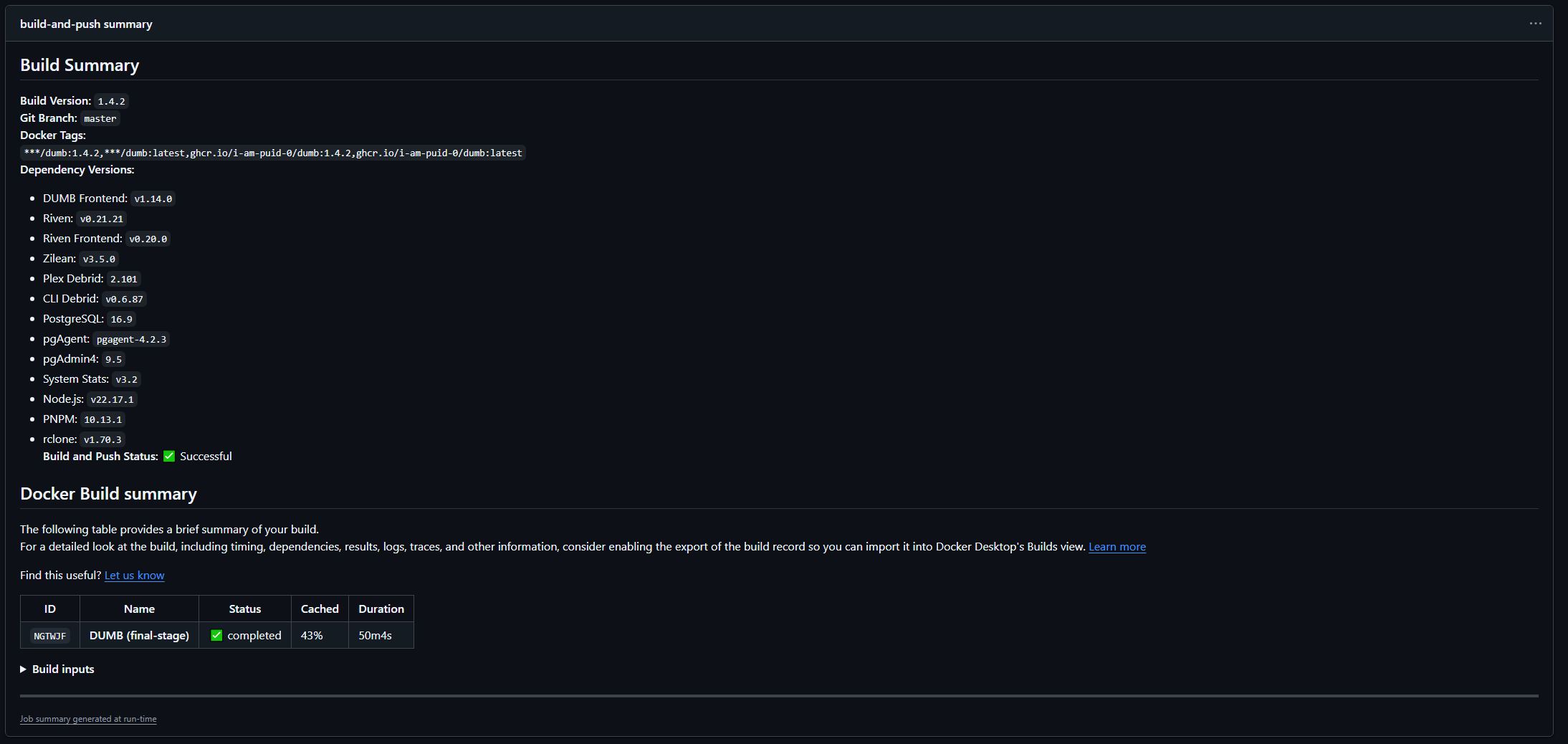
To check, click on one of the Docker Image CI jobs to see the Build Summary
Example Build Summary below:
Visual guide: Choose the next check for a failed page, app, import or playback.
Authentication
How do I enable authentication?
Authentication can be enabled during the first-time setup or later via Settings:
- Navigate to Settings in the sidebar
- Find the Authentication section
- Click Enable Authentication
- If no users exist, create the first local account
See the Authentication Guide for details.
I'm locked out of DUMB - how do I reset authentication?
Use the lockout recovery procedure. Disabling authentication temporarily does not reset an existing user's password or remove its account.
Why do I get "Invalid credentials" when logging in?
- Usernames are case-sensitive
- Verify the password is correct
- Check if your user account is disabled in Settings User Management
My session keeps expiring - what's wrong?
- Access tokens expire after 60 minutes by default
- The frontend should automatically refresh tokens
- If issues persist, clear browser storage and log in again
- Check if "Remember Me" was checked during login
WebSocket and Real-time Updates
Dashboard status is not updating in real-time
- Check the WebSocket connection indicator in the header
- Verify your browser supports WebSocket connections
- Check for network/firewall issues blocking WebSocket
- Try refreshing the page to reconnect
Metrics page shows "Disconnected"
- The metrics WebSocket may have dropped
- The frontend will automatically reconnect
- If it persists, check DUMB API logs for errors
Services
How do I access service UIs?
Open the service page's Embedded UI tab. The dashboard selects the route for that exact service instance. Direct native-port access requires an explicitly published Docker port; a configured listener alone is not reachable from the host.
See Embedded service UIs for routing and access protection.
Why can no services start after the container has been running for days?
On older images, orphaned zombie processes from a bundled service can accumulate until the container reaches its PID limit. New process and thread creation then fails, affecting unrelated services and health checks.
Inspect the PID usage and exited processes while the container still accepts commands:
docker exec <container> sh -c 'cat /sys/fs/cgroup/pids.current /sys/fs/cgroup/pids.max'
docker exec <container> ps -eo pid,ppid,stat,comm
Repeated Z process states with parent PID 1 and increasing PID usage are
consistent with this failure. Update to a DUMB image containing the container
init fix and recreate the container with the same persistent volumes. The new
init process collects orphaned children after they exit. If you override the
image entrypoint, enable Docker --init or Compose init: true.
Recreating or restarting interrupts running services; schedule it during a maintenance window. A restart clears existing zombies, while raising the PID limit only delays exhaustion if the processes continue accumulating. Preserve service configuration and databases when recreating the container.
A service keeps restarting - what should I do?
- Check the service logs for error messages
- Verify the service configuration is valid
- Check if dependencies are running
- Review auto-restart settings in the service config
See Auto-restart for more information.