CLI Debrid (Core Service)
CLI Debrid acquires and upgrades media through Debrid providers. Configure content sources, scrapers, provider credentials, and library paths in CLI Debrid after DUMB installs its runtime and selected dependencies.
Development update · not in the released 2.23.0 docs
Technical details: installed CLI Battery layout
CLI Battery follows the installed layout
The CLI Battery rewrite
introduced in CLI Debrid v0.7.29
converts CLI Battery from a separate Flask service on port 5001 into an
in-process Python module imported by CLI Debrid.
DUMB recognizes the installed files rather than inferring the layout from
a release tag, branch, or commit label. For a recognized embedded layout,
startup and dependency handling skip the managed standalone Battery even
when its saved toggle is enabled. For a standalone layout that still
provides cli_battery/main.py, keep CLI Battery enabled; DUMB starts it
before CLI Debrid. A separately configured Battery command or source
directory is left under its existing configuration.
Before launching CLI Debrid after a layout change, DUMB stops a tracked managed standalone Battery when the installed layout is embedded. If you return to a standalone layout, the retained enabled setting lets DUMB start Battery first again.
First start
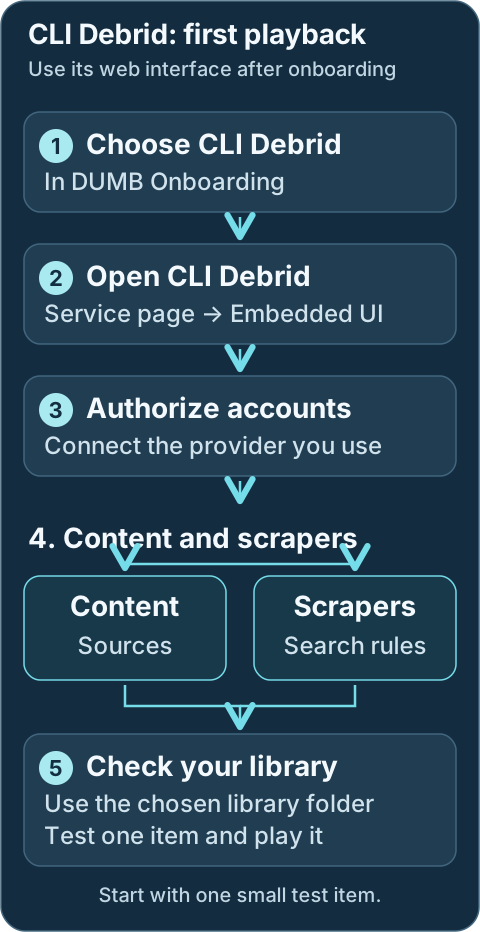
- Choose CLI Debrid in DUMB onboarding and select its provider, supporting services and library paths. Reopen onboarding with Settings → Launch Onboarding if needed.
- Open the CLI Debrid service card. Wait for its selected supporting services to start; on DUMB Config, choose Start if CLI Debrid is stopped. Select Embedded UI to open its setup interface.
- Authorize the accounts you use. Choose your content sources, which tell CLI Debrid what you want, and scrapers, which find matching sources. Review quality and collection rules before enabling large lists.
- Review Original Files Path and the collection mode in CLI Debrid. Use Symlinked/Local if it should create an organized linked library; use Plex if it should monitor the chosen Plex libraries. See Mount Considerations for screenshots and the path checks.
- Add the chosen organized library folder to your media server. If using Plex authorization, configure and start Plex first, then verify the saved Plex URL remains reachable.
- Add one intended item to your chosen source. Watch it progress through the queues, confirm it appears in the expected media library, and play it before importing large lists.
Check the CLI Battery layout note above before selecting an upstream development release. A running CLI Debrid service does not prove that its sources, scrapers and library are ready.
Development update · not in the released 2.23.0 docs
Setup checklist and remaining work
Review the selected source's standalone/integrated Battery layout and PhalanxDB choice. Dependencies and installation are separate from native content, collection, scraper and library choices. Finish those tasks and validate a real import/playback.
Requires the backend setup-arrangement capability. See Setup checklist and automation for retained tasks, coverage and safe retries.
Workflow diagram
Geek details: how requests, providers, mounts and libraries connect
%%{ init: { "flowchart": { "curve": "basis" } } }%%
flowchart TD
    A([Request sources:<br/>Seerr, Trakt,<br/>Plex Watchlist])
    B[[Prowlarr / Indexers]]
    C[CLI Debrid]
    D@{shape: cloud, label: "Debrid providers"}
    E[Zurg or Decypharr<br/>WebDAV]
    F[(Rclone WebDAV Mount<br/>Root Path:<br/>/mnt/debrid/clid)]
    G[Rename + Link Step:<br/>Symlinks]
    H[(Final Symlink Root:<br/>/mnt/debrid/clid_symlinks)]
    I([Media Servers:<br/>Plex, Jellyfin, Emby])

    A <==> C
    B <==> C
    C <==> D
    D e1@=== E
    C ==> G
    G ==> H
    F ===> C
    F e2@=== H
    E e3@=== F
    H e4@=== I

    classDef animate stroke-dasharray: 9,5,stroke-dashoffset: 900,animation: dash 25s linear infinite;
    class e1,e2,e3,e4 animate
Service Relationships
CLI Debrid collects items from the sources you choose and organizes them for your media server. Its selected supporting services start through DUMB; Zilean is an optional scraper. Keep dependencies enabled for the installed CLI Debrid layout described above.
Geek details: service classification and runtime dependencies
| Classification | Role |
|---|---|
| Core Service | Debrid Orchestrator |
| Depends On | Stable/older releases: CLI Battery; provider path: rclone and Zurg |
| Optional | Phalanx DB, Zilean |
| Exposes UI | Yes (Flask app on port 5000) |
Technical details: configuration reference
Configuration in dumb_config.json
{
"cli_debrid": {
    "enabled": false,
    "process_name": "CLI Debrid",
    "repo_owner": "godver3",
    "repo_name": "cli_debrid",
    "release_version_enabled": false,
    "release_version": "v0.6.07",
    "commit_sha": "",
    "branch_enabled": false,
    "branch": "main",
    "suppress_logging": false,
    "log_level": "INFO",
    "port": 5000,
    "auto_update": false,
    "auto_update_interval": 24,
    "auto_update_start_time": "04:00",
    "symlink_backup_enabled": false,
    "symlink_backup_interval": 168,
    "symlink_backup_start_time": "04:00",
    "symlink_backup_path": "/config/symlink-repair/snapshots/cli-debrid-{timestamp}.json",
    "symlink_backup_include_broken": true,
    "symlink_backup_retention_count": 1,
    "symlink_backup_roots": [
        "/mnt/debrid/clid_symlinks"
    ],
    "clear_on_update": true,
    "exclude_dirs": [
        "/cli_debrid/data"
    ],
    "platforms": [
        "python"
    ],
    "command": [
        "/cli_debrid/venv/bin/python",
        "main.py"
    ],
    "config_dir": "/cli_debrid",
    "config_file": "/cli_debrid/data/config/config.json",
    "log_file": "/cli_debrid/data/logs/debug.log",
    "env": {
        "USER_CONFIG": "/cli_debrid/data/config/",
        "USER_LOGS": "/cli_debrid/data/logs/",
        "USER_DB_CONTENT": "/cli_debrid/data/db_content/",
        "CLI_DEBRID_PORT": "{port}"
    }
}
}
Key configuration fields
enabled: Toggle to run CLI Debrid via DUMB.process_name: Used for display and logs.repo_owner,repo_name: GitHub repo to use for updates.release_version_enabled,branch_enabled: Target a specific tag or branch.commit_sha: Build an exact CLI Debrid revision from its full 40-character GitHub SHA.log_level,suppress_logging: Logging controls.port: Flask web interface port.env: Environment variable configuration used by CLI Debrid.env.CLI_DEBRID_BATTERY_PORT: Battery API port consumed by standalone CLI Debrid layouts. It is not present in the untouched template; DUMB creates/synchronizes it fromcli_battery.portduring setup and config updates. The embedded layout does not use this network hop.clear_on_update,exclude_dirs: Clean old files during update while protecting data dirs.
Development update · not in the released 2.23.0 docs
If startup reports a runtime preparation error, open Service Logs and keep the reported path with your support request. DUMB leaves conflicting existing data in place for review.
Geek details: persistent-data aliases and runtime ownership checks
Persistent data after installation
When the configured paths use <config_dir>/data, DUMB checks that this alias
points to <data_root>/cli_debrid after installation and before launching CLI
Debrid. With the defaults, /cli_debrid/data points to /data/cli_debrid.
This check also runs when an exact release is reinstalled.
DUMB can restore a missing alias or replace an empty directory placeholder. It refuses to replace a nonempty data directory, a mounted directory, or a link pointing somewhere else. Existing data is retained for review. Custom absolute config, log, and database paths remain in use; they do not require changing back to the default alias.
Required data directories and known writable runtime files are prepared for the configured service user. DUMB does not recursively change ownership of the whole CLI Debrid installation or unrelated data. If startup reports a runtime preparation error, review the exact paths in the message before changing their contents or ownership.
What CLI Debrid Does
Intelligent Automation
- Monitors your Plex library or local folder structure (symlinked library)
- Scrapes for content from various sources (Zilean, Jackett, Torrentio, Nyaa, Media Fusion)
- Downloads new or upgraded content using Debrid providers
- Optionally leverages webhook notifications from Seerr or Zurg to trigger updates
Supported Features
- Content Sources: MDBList, Trakt, Seerr
- Upgrading: Queue system for quality upgrades
- Web UI: Web dashboard for real-time monitoring and control
- Metadata: Cached locally in the
cli_battery - Notifications: Optional support for Discord, Email, Telegram, NTFY
- Scraping Tuning: Manual test interface to evaluate scraper priorities
Standalone CLI Battery
Required only by layouts that still use the standalone service
Keep CLI Battery enabled for installed CLI Debrid layouts that call its
API on port 5001. See the layout guidance near the top of this page before
selecting an upstream version that embeds Battery.
Technical details: configuration example
{
"cli_battery": {
    "enabled": false,
    "process_name": "CLI Battery",
    "suppress_logging": false,
    "log_level": "INFO",
    "port": 5001,
    "platforms": [
        "python"
    ],
    "command": [
        "/cli_debrid/venv/bin/python",
        "cli_battery/main.py"
    ],
    "config_dir": "/cli_debrid",
    "config_file": "/cli_debrid/data/config/settings.json",
    "log_file": "/cli_debrid/data/logs/battery_debug.log",
    "env": {
        "PYTHONPATH": "/cli_debrid",
        "USER_CONFIG": "/cli_debrid/data/config/",
        "USER_LOGS": "/cli_debrid/data/logs/",
        "USER_DB_CONTENT": "/cli_debrid/data/db_content/",
        "CLI_DEBRID_BATTERY_PORT": "{port}"
    }
}
}
CLI Battery provides local metadata storage and Trakt integration, acting as the "memory" of CLI Debrid.
Optional Utility: Phalanx DB
Technical details: configuration example
{
"phalanx_db": {
    "enabled": false,
    "process_name": "Phalanx DB",
    "repo_owner": "godver3",
    "repo_name": "phalanx_db_hyperswarm",
    "release_version_enabled": false,
    "release_version": "v0.50",
    "commit_sha": "",
    "branch_enabled": false,
    "branch": "main",
    "suppress_logging": false,
    "log_level": "INFO",
    "port": 8888,
    "auto_update": false,
    "auto_update_interval": 24,
    "clear_on_update": true,
    "exclude_dirs": [
        "/phalanx_db/data"
    ],
    "platforms": [
        "pnpm"
    ],
    "command": [
        "node",
        "phalanx_db_rest.js"
    ],
    "config_dir": "/phalanx_db",
    "log_file": "/log/phalanx_db.log",
    "env": {}
}
}
While listed as optional, the onboarding process will treat it as a dependent service and enable it by default. You can disable it from the DUMB Frontend if desired
Phalanx DB provides distributed metadata storage via Hyperswarm. It is optional but can enhance metadata resilience and syncing.
Mount Considerations
CLI Debrid can create symlinks to be used in the media server, or if using the rclone mounts directly in the media server it can monitor the Plex libraries for completed items.
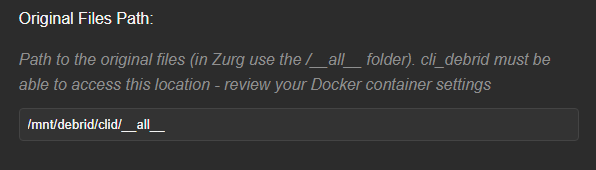
In both cases, ensure the appropriate path for the rclone or zurg mount is used when adding the Original Files Path.
Original Files Path
The Original Files Path is relative to the paths inside the container.
Example: As default when configured with the onboarding process, the rclone mount_dir is set to /mnt/debrid, the rclone mount_name is set to clid, and it is using zurg_enabled: true for rclone, then the path should be:
As mentioned, CLI Debrid also monitors either the created symlinks or the Plex libraries for completed items.
As such, it's important to ensure you select the appropriate option for your deployment.
Collection Mode Selection
Symlinked/Local will create symlinks in the user defined path, whereas Plex will monitor the Plex Libraries defined and not create symlinks.


Symlink repair and migration
For the complete DUMB symlink guide (UI option behavior, root scope, backup/restore, schedule, retention, and migration playbooks), see Symlink Operations.
Use Symlink Operations for the frontend repair and backup controls. Preview changes to the selected CLI Debrid library, review the proposed targets and retain a manifest before applying repairs. You only need this when maintaining or moving an existing library.
Geek details: API repairs, root migration and scheduled manifests
For CLI Debrid symlink libraries (commonly /mnt/debrid/clid_symlinks), DUMB exposes
POST /api/process/symlink-repair to rewrite symlink targets after mount-path changes.
Example custom rewrite for CLI Debrid:
{
  "dry_run": true,
  "roots": ["/mnt/debrid/clid_symlinks"],
  "rewrite_rules": [
    {
      "from_prefix": "/mnt/debrid/clid_old",
      "to_prefix": "/mnt/debrid/clid"
    }
  ]
}
Set "dry_run": false to apply and optionally set backup_path for a manifest.
If you need to move the symlink tree itself (not just rewrite targets), use root_migrations:
{
  "dry_run": false,
  "root_migrations": [
    {
      "from_root": "/mnt/debrid/clid_symlinks_old",
      "to_root": "/mnt/debrid/clid_symlinks"
    }
  ]
}
If you want to populate another service symlink tree without removing CLI Debrid entries
(for example /mnt/debrid/clid_symlinks to /mnt/debrid/decypharr_symlinks), include
"copy_instead_of_move": true in the same request.
For recurring backups of existing symlink libraries, use service config keys
symlink_backup_enabled, symlink_backup_interval, symlink_backup_start_time,
and symlink_backup_path to enable DUMB’s internal scheduler. Keep generated manifests for
POST /api/process/symlink-manifest/restore recovery runs.
Use symlink_backup_retention_count to keep only the newest N scheduled manifests (0 keeps all).
Plex Media Server Built-in!
With Plex Media Server enabled in DUMB, you can also leverage it with CLI Debrid.
As shown below, if you select to "Sign in to Plex" during the CLI Debrid onboarding, it will allow you to select the local instance of Plex Media Server.
Plex Media Server Requirement
Plex Media Server must be configured and running in DUMB before it will appear in the list of available servers.

Signing into Plex and selecting the DUMB Plex Media Server will pre-populate the "Plex URL" and "Plex Token" within the CLI Debrid onboarding.
Plex URL Configuration
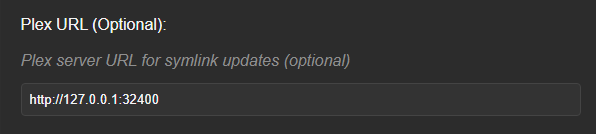
However, note that it sets the "Plex URL" as the DUMB docker container's IP Address:
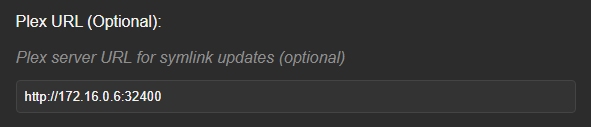
This may cause issues if the address changes for the container, so it is suggested to change the "Plex URL" as shown below:
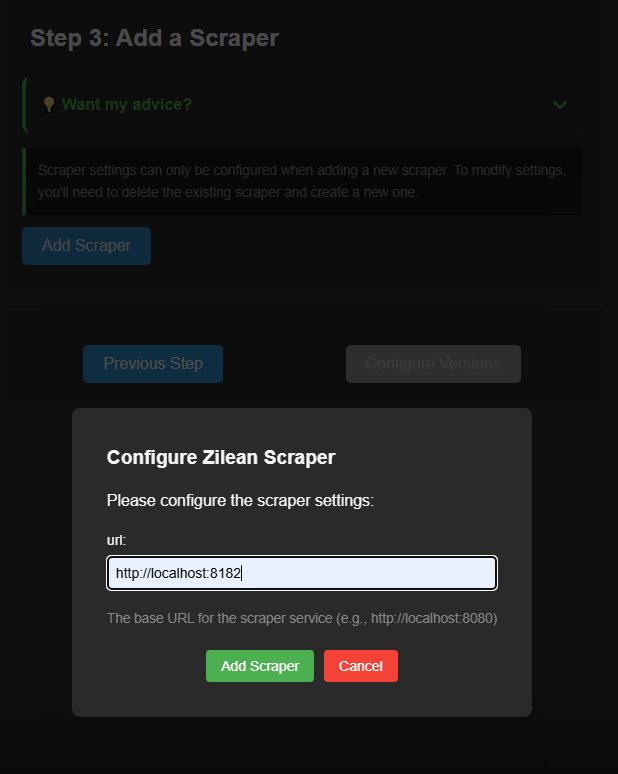
Zilean Built-in!
With Zilean enabled in DUMB, you can also leverage it with CLI Debrid
Check request progress
Open CLI Debrid's queue views to follow your test item. Wanted and Scraping mean a source is still being found; Adding and Checking mean the item is being sent to the provider or checked for collection. Review the item's status when progress stops. An unreleased item may simply be waiting for its release, while an uncached item may need time or available account capacity.
If the item is collected but missing from Plex, compare the saved collection folder with the Plex library folder and check the library scan. Avoid re-adding a large list while diagnosing one item.
Geek details: queue scheduling, state transitions and webhook integration
Queues & Processing (Behind the Scenes)
- Wanted Queue: Items identified from your lists that need to be downloaded but haven't been processed by the scraper yet. Shows the time the item was last scraped. If within 24 hours of scraping items will remain in the Wanted queue.
- Scraping Queue: Items actively being searched for download sources (torrents/magnets).
- Adding Queue: Items for which a source has been found and are being added to your debrid service
-
Checking Queue: Monitoring items for presence locally or in Plex.
-
Cached: Available in debrid cache and ready to use.
-
Downloading: Currently being downloaded with progress shown; grouped if multiple files.
-
Filenames: Can be toggled to show specific files being processed
-
-
Unreleased: Items identified but waiting for their release date before processing continues. Displays the relevant release date(s). Items requiring a physical release will indicate this.
- Blacklisting: Items that have been explicitly marked to be ignored by the application.
- Upgrading Queue: Items that are being considered for Upgrading. They have been collected and now for 24 hours cli_debrid will try to find upgrades once an hour.
- Final Check: Items for which initial scraping attempts failed. These items wait for a configured delay (defined in settings) before one last search attempt is automatically triggered. Shows when the item entered this waiting period. If the final search is successful, the item moves to Adding. If it fails again, the item is typically moved to Blacklisted.
- Pending Uncached: Items associated with uncached torrents that would take your account over its limit wait in the Pending Uncached queue until your download limit returns to normal.
- Sleeping Queue: Items that cli_debrid failed to find. Shows a 'Wake Count' indicating how many times the item has been retried.
All queues are managed on scheduled intervals.
Webhook Support
CLI Debrid can listen for:
- Seerr Webhooks: Add content when users request it
- Zurg Webhooks: React to completed downloads (Symlink mode)
Geek details: configure a Zurg webhook script
Example Zurg update hook:
Service updates
Use the service's DUMB Config to review its update settings, then Save to File. Read source selection and update modes before switching a working installation to a development release or pinning a revision.
Geek details: release, branch and exact commit configuration
Commit / Branch / Version Targeting
You can control which source revision is deployed by setting:
commit_shato a full 40-character SHA for an immutable source pinbranch_enabled: trueand specifying abranch- or
release_version_enabled: trueand specifying arelease_version
The exact commit overrides release and branch selection and disables automatic updates until the pin is changed or cleared.
Dev releases use the prerelease tag
CLI Debrid dev builds are published as GitHub prereleases. To track dev, enable
release_version_enabled and set release_version to prerelease.
"cli_debrid": {
    "enabled": true,
    "process_name": "CLI Debrid",
    "repo_owner": "godver3",
    "repo_name": "cli_debrid",
    "release_version_enabled": true,
    "release_version": "prerelease",
    "commit_sha": "",
    "branch_enabled": false,
    "branch": "main",
    "suppress_logging": false,
    "log_level": "INFO",
    "port": 5000,
    "auto_update": true,
    "auto_update_interval": 1
}
"cli_debrid": {
    "enabled": true,
    "process_name": "CLI Debrid",
    "repo_owner": "godver3",
    "repo_name": "cli_debrid",
    "release_version_enabled": false,
    "release_version": "v0.6.07",
    "commit_sha": "",
    "branch_enabled": false,
    "branch": "main",
    "suppress_logging": false,
    "log_level": "INFO",
    "port": 5000,
    "auto_update": true,
    "auto_update_interval": 1
}
Access
Open the service from DUMB's Embedded UI tab when available. The native URLs below require the corresponding Docker host port to be published; use the port saved in your running configuration.
-
Navigate to:
http://<host>:<port> -
default port
5000