Decypharr (Core Service)
Decypharr connects Sonarr and Radarr to Debrid providers, Usenet providers, or both. Use DUMB to select and start the workflow, then use Decypharr to review providers and queues. The instructions below cover a new setup; existing libraries also need a path and backup review before changes.
First start
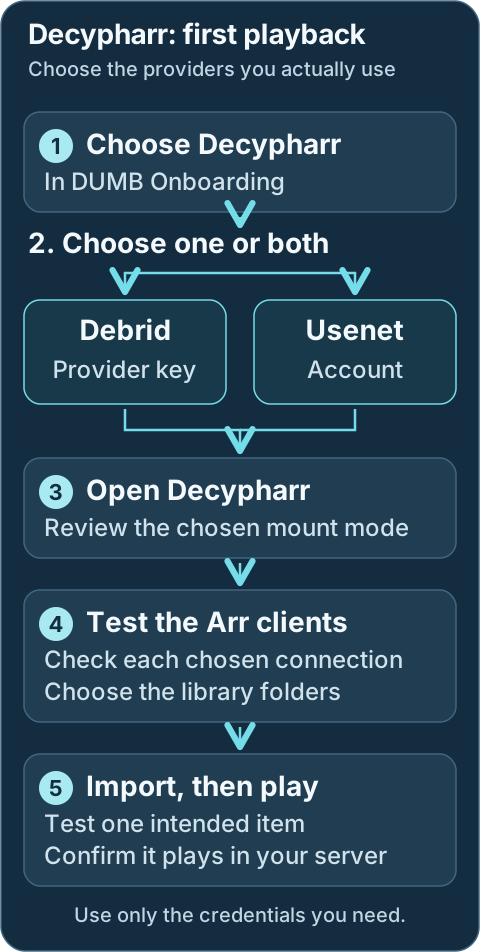
- Choose Decypharr in DUMB onboarding and select Debrid, Usenet, or both. Select the Arr applications and media server that will use it. Reopen onboarding from Settings → Launch Onboarding when needed.
- Enter the Debrid account API keys you intend to use and choose the mount mode. For a new Decypharr-managed filesystem,
dfsis the recommended default. Existing libraries should retain their current paths until a migration is planned. - Open the Decypharr service card. On DUMB Config, choose Start if stopped, then open Embedded UI. Review the provider configuration. For Usenet, add and test your NNTP account in Decypharr; a Debrid key does not replace that account.
- Open Sonarr or Radarr's Embedded UI → Settings → Download Clients and test the generated Decypharr client. A Debrid client uses the qBittorrent-compatible connection; Usenet uses the SABnzbd-compatible connection. Test indexers under Settings → Indexers too.
- Review Settings → Media Management → Root Folders in each Arr. Use the saved curated folder as the corresponding media-server library source. See root folders for Decypharr-only and combined paths.
- Request one intended item and follow its Arr queue through import. Scan the media-server library and play it before enabling broad acquisition.
For an existing library, preview Symlink Operations before changing mount paths. Keep a backup and review the preview before applying a repair.
Protect provider credentials
Debrid API keys and Usenet credentials grant access to your accounts. Keep them private and do not include them in shared screenshots or logs.
Development update · not in the released 2.23.0 docs
Setup checklist and remaining work
The checklist separates Debrid-only, Usenet and hybrid decisions. Enter a Usenet account or reference another selected client with its own allocation. Arr/client/root wiring is reconciled after both endpoints are ready. Missing credentials or choices remain visible instead of requiring restarts to discover missed links.
Requires the backend setup-arrangement capability. See Setup checklist and automation for retained tasks, coverage and safe retries.
Workflow diagram
Geek details: how requests, providers, mounts and libraries connect
%%{ init: { "flowchart": { "curve": "basis" } } }%%
flowchart TD
    A([Request Sources:<br/>Seerr, Trakt,<br/>Plex Watchlist,<br/>NeutArr])
    B[Arr Services:<br/>Sonarr, Radarr,<br/>Lidarr,<br/>Whisparr]
    C[[Prowlarr / Indexers]]
    D[Decypharr]
    E@{shape: cloud, label: "Debrid Providers"}
    F[[DFS / Rclone<br/>Mount Mode]]
    G[(WebDAV Mount Root Path:<br/>/mnt/debrid/decypharr)]
    H[(QBit Download Symlinks:<br/>/mnt/debrid/<br/>decypharr_downloads)]
    I[Arr Rename + Link Step:<br/>Hard Link / Symlink]
    J[(Final Symlink Root:<br/>/mnt/debrid/<br/>decypharr_symlinks)]
    K([Media Servers:<br/>Plex, Jellyfin,<br/>Emby])

    E === D
    D === F
    linkStyle 0 stroke:transparent,stroke-width:0;
    linkStyle 1 stroke:transparent,stroke-width:0;

    A ==> B
    C <==> B
    B <==> D
    D e1@==> E
    F e2@==> D
    F e3@==> G
    D ==> H
    H ==> G
    H ==> B
    B ==> I
    I ==> J
    J e4@==> G
    K e5@<==> J


    classDef animate stroke-dasharray: 9,5,stroke-dashoffset: 900,animation: dash 25s linear infinite;
    class e1,e2,e3,e4,e5 animate
Service Relationships
Decypharr connects the Arr applications you select to Debrid or Usenet providers. Your media server reads the organized library. DUMB starts the selected supporting services; keep the workflow and provider choices consistent with the library you want.
Geek details: service classification and runtime dependencies
| Classification | Role |
|---|---|
| Core Service | Debrid and Usenet Orchestrator |
| Depends On | None by default; external rclone mode uses rclone |
| Optional | Sonarr, Radarr, Lidarr, Whisparr, Prowlarr, NeutArr |
| Exposes UI | Yes (Web UI) |
Technical details: configuration reference
Configuration in dumb_config.json
{
"decypharr": {
    "enabled": false,
    "process_name": "Decypharr",
    "repo_owner": "sirrobot01",
    "repo_name": "decypharr",
    "release_version_enabled": false,
    "release_version": "v1.0.0",
    "commit_sha": "",
    "branch_enabled": false,
    "branch": "main",
    "suppress_logging": false,
    "log_level": "INFO",
    "port": 8282,
    "auto_update": false,
    "auto_update_interval": 24,
    "auto_update_start_time": "04:00",
    "symlink_backup_enabled": false,
    "symlink_backup_interval": 168,
    "symlink_backup_start_time": "04:00",
    "symlink_backup_path": "/config/symlink-repair/snapshots/decypharr-{timestamp}.json",
    "symlink_backup_include_broken": true,
    "symlink_backup_retention_count": 1,
    "symlink_backup_roots": [
        "/mnt/debrid/decypharr_symlinks"
    ],
    "clear_on_update": false,
    "exclude_dirs": [],
    "command": [
        "/decypharr/decypharr",
        "--config",
        "/decypharr"
    ],
    "config_dir": "/decypharr",
    "config_file": "/decypharr/config.json",
    "log_file": "/decypharr/logs/decypharr.log",
    "env": {},
    "mount_type": "dfs",
    "mount_path": "/mnt/debrid/decypharr",
    "api_keys": {}
}
}
Key configuration fields
enabled: Toggle to run Decypharr via DUMB.process_name: Used for display and logs.repo_owner,repo_name: GitHub repo to use for updates.release_version_enabled,branch_enabled: Target a specific tag or branch.commit_sha: Build an exact Decypharr source revision from its full 40-character GitHub SHA.log_level,suppress_logging: Logging controls.port: Web UI port.env: Environment variables passed to Decypharr.mount_type: Decypharr mount mode. Stable Decypharr 2.0+ supportsdfs,rclone,external_rclone, andnonewithout requiring the beta branch.mount_path: Container path for the Decypharr mount (default/mnt/debrid/decypharr).api_keys: Per-provider API keys used by Decypharr for Debrid providers.clear_on_update,exclude_dirs: Clean old files during update while protecting data dirs.
Because release_version_enabled is false, the stored v1.0.0 value is only the fallback selector; normal stable installs resolve the latest supported GitHub release. Enable the selector only when intentionally pinning a release.
Exact commit pin
Set commit_sha to a full 40-character SHA to build that immutable
Decypharr revision. The commit pin overrides release and branch settings,
uses Decypharr's source-build path, and disables automatic updates until
changed or cleared.
What Decypharr does
Use Decypharr's web interface to review providers and the queue. Linked Arr applications request content and organize it into the root folders you selected. The media server should scan those curated folders.
Geek details: download-client compatibility and processing features
How It Works
Decypharr acts as both a torrent manager and a renaming/organizing engine:
- Handles torrent links via Debrid services
- Handles NZB/Usenet downloads through Decypharr 2.0+ native Usenet support
- Mimics qBittorrent and Sabnzbd-compatible APIs for Arr download-client integration
- Renames and organizes files into structured symlink folders
- Provides a Web UI and WebDAV endpoints for remote management
Supported Features
- Mock Qbittorrent API for Sonarr, Radarr, Lidarr, etc.
- Full-featured UI for managing torrents
- Proxy filtering for un-cached Debrid torrents
- Multiple Debrid service support (Real Debrid, Torbox, Debrid Link, All Debrid, Premiumize)
- WebDAV server per Debrid provider for mounting remote files
- DFS mount mode for Decypharr-managed streaming paths (stable in Decypharr 2.0+)
- Native Usenet support through Decypharr's Sabnzbd-compatible endpoint (stable in Decypharr 2.0+)
- Repair Worker for missing files or symlinks
Integration with DUMB
Select the intended Arr applications during onboarding. Test the generated clients and saved folders in their own interfaces before adding broad automation. The maintenance steps below apply when moving or repairing an existing library.
Geek details: how DUMB generates Decypharr and Arr settings
When Decypharr starts, DUMB performs several automation steps:
- Writes the selected Debrid provider, API key, download folder, and mount settings to the current Decypharr config schema before the first process launch
- Syncs Arr instance details into
config.json - Ensures
/mnt/debrid/decypharr_symlinks/<instance>roots exist - Updates Arr permissions and root folders
- Adds or updates a qBittorrent-style download client named
decypharrin Arr - Populates Debrid providers from
api_keysfor Decypharr mount modes - Uses per-instance category labels when creating Arr download client entries
- Adds a Sabnzbd-style download client named
decypharr-usenetwhen Decypharr Usenet providers are configured
When Decypharr is installed through DUMB onboarding, this pre-start configuration satisfies Decypharr's own first-run checks. You should land in the normal Decypharr UI instead of being asked to repeat its standalone setup wizard. The Decypharr wizard remains useful for installations managed outside DUMB.
Symlink repair and migration
For the complete DUMB symlink guide (UI option behavior, root scope, backup/restore, schedule, retention, and migration playbooks), see Symlink Operations.
Open Symlink Operations for the frontend repair, backup and restore workflow. Preview the affected library roots first, then review the proposed changes and keep a recovery manifest before applying them. This is a library maintenance task, not part of a new setup.
Geek details: repair or migrate links through the API
If mount layouts change (for example provider-path changes between Decypharr modes), use
POST /api/process/symlink-repair to rewrite existing symlink targets instead of manually relinking.
Common Decypharr migration:
Apply changes:
{
  "dry_run": false,
  "presets": ["decypharr_beta_consolidated"],
  "backup_path": "/config/symlink-repair/decypharr-manifest.json"
}
When Arr core_service changes from Decypharr-only to combined Decypharr+InfiniDysk, root folders move
from /mnt/debrid/decypharr_symlinks/<slug> to /mnt/debrid/combined_symlinks/<slug>.
Use root migration mode:
{
  "dry_run": false,
  "root_migrations": [
    {
      "from_root": "/mnt/debrid/decypharr_symlinks",
      "to_root": "/mnt/debrid/combined_symlinks"
    }
  ],
  "backup_path": "/config/symlink-repair/decypharr-combined-manifest.json"
}
To clone entries into the new root while keeping the old root intact (for staged imports),
set "copy_instead_of_move": true.
For periodic safety snapshots, set service config keys symlink_backup_enabled,
symlink_backup_interval, symlink_backup_start_time, and symlink_backup_path
to let DUMB run internal scheduled snapshots. You can also run/manual restore via
POST /api/process/symlink-manifest/backup and POST /api/process/symlink-manifest/restore.
Set symlink_backup_retention_count to keep only the newest N scheduled manifests (0 disables pruning).
Startup timing
If the Decypharr UI is not reachable yet, DUMB retries the download-client setup shortly after startup.
Download client credentials
DUMB configures the Arr qBittorrent download client to point at 127.0.0.1:<port> and uses the Arr host/API key
as the username/password pair expected by Decypharr.
Geek details: select workflow services with JSON
Arr core_service setting
For Sonarr/Radarr/Lidarr/Whisparr instances you want wired to Decypharr, set
core_service to decypharr or include it in a list:
This tells DUMB to auto-configure Arr integration around Decypharr’s WebDAV and symlink workflows.
See Core Service Routing for how core_service affects automation.
To successfully run Decypharr with DUMB, review the mount mode and path guidance below:
Mount modes
Decypharr 2.0+ includes DFS and native Usenet support in stable releases. You no longer need to install the beta branch to use these features.
Choose the mount behavior during onboarding or in Decypharr's DUMB Config. Save DUMB-level changes with Save to File; apply them when it is safe to restart the service.
Geek details: mount configuration example
Choose the mount behavior with mount_type:
For a new Decypharr-managed folder, dfs is the recommended default. Built-in rclone is another managed folder option. external_rclone uses a separate DUMB-managed mount, while none is for setups that do not need Decypharr to supply a local folder. Review existing consumers before changing a working mount.
Geek details: mount implementations and provider synchronization
| Mount Type | Description |
|---|---|
dfs |
Decypharr File System. Recommended default for Decypharr-managed streaming paths. |
rclone |
Embedded rclone managed by Decypharr. DUMB synchronizes Debrid providers from api_keys. |
external_rclone |
DUMB-managed external rclone mount pointed at Decypharr WebDAV. |
none |
No mount; Decypharr exposes API/WebDAV behavior only. |
Geek details: mount ownership and configuration reconciliation
When mount_type is rclone, DUMB builds the embedded rclone block and synchronizes debrids entries from the api_keys map. When mount_type is external_rclone, DUMB reconciles the matching managed rclone instance. DFS settings such as mount.dfs.cache_dir are app-owned; DUMB only ensures required startup paths exist and have the configured ownership.
Native Usenet
Add and test your Usenet provider account in Decypharr's Embedded UI. Then open the linked Arr's Embedded UI → Settings → Download Clients and test decypharr-usenet. If you also use Debrid, keep and test the separate Debrid download client. Both can be used by the same Arr.
Geek details: alternative manual SABnzbd-compatible client setup
Decypharr 2.0+ can connect directly to NNTP providers (no Sabnzbd container needed).
Configure Usenet inside the Decypharr UI or config.json. DUMB does not manage
Usenet provider credentials.
To wire Arrs to Decypharr Usenet manually, add a Sabnzbd download client in Sonarr/Radarr:
- Host:
127.0.0.1for an Arr running inside DUMB; use a reachable DUMB address for an external Arr. - Port: Decypharr's saved DUMB port, normally
8282. - API Key: Decypharr API token (Settings → Auth).
- Category: the category configured for that Arr instance, normally
sonarrorradarr.
Development update · not in the released 2.23.0 docs
The development integration uses URL Base /sabnzbd, preceded by Decypharr's configured URL base when one is set. Use the generated client as the reference rather than copying an older release's URL base.
DUMB creates this Sabnzbd-compatible client automatically for Arr instances whose
core_service includes decypharr after Decypharr has Usenet providers configured. You can keep the normal Decypharr qBittorrent-style client for torrents and use the Sabnzbd-style client for NZBs.
Geek details: manual credentials, API pacing and external-container mounts
Embedded provider keys
Use api_keys to define provider credentials:
{
"api_keys": {
  "realdebrid": "rd_...",
  "torbox": "tb_...",
  "alldebrid": "ad_...",
  "debridlink": "dl_..."
}
}
Protect API keys
Debrid API keys grant access to your account. Treat them like secrets.
TorBox API pacing
DUMB uses a conservative starting profile when adding TorBox or filling missing or empty provider settings:
rate_limit paces routine requests at two per second, about 120 per minute sustained. torrents_refresh_interval refreshes the provider torrent catalog every 30 minutes, trading catalog freshness for fewer full-list requests. Download-link refresh and worker settings keep their mount-mode defaults.
Existing nonempty tuning is preserved, including values saved by earlier DUMB versions. Defaults for other providers are unchanged. To apply this profile to an existing TorBox entry, open Decypharr's Service Config tab in the dashboard, find its entry under debrids, and edit only the two fields above. Keep its credentials and other settings, then Save Service Config and restart Decypharr when ready to apply the change. See service configuration editors.
TorBox's current API limits specify a general ceiling of 300 requests per minute separately for each endpoint and API key, with tighter hourly limits for some creation operations. DUMB's profile is a starting point for reducing routine API pressure. Retries, media range requests, and other applications using the same key have their own request behavior and can still encounter limits.
1. Bind Mount Setup
If you are passing the rclone mount to an external Arr or media server container, include the following bind mounts in both your DUMB and arrs docker-compose files (replace ... with the full host path to your DUMB bind mount):
When Required
These mounts are only required when Arrs or media servers run outside the DUMB container and need access to the rclone mount and Decypharr symlinks.
2. Configure Root Folders in Arrs
When core_service is set to decypharr (or includes it), DUMB
automatically creates the root folders and updates the Arr settings for you.
If core_service includes Decypharr plus another workflow service such as infinidysk or altmount, the Arr root folder base switches to /mnt/debrid/combined_symlinks/<slug>. Decypharr-only hybrid Debrid+Usenet setups keep the Decypharr root.
Manual configuration is only required when core_service is left blank or you
want to override the combined workflow wiring.
Inside the Sonarr and Radarr web UI:
- Navigate to Settings > Media Management > Root Folders
-
Add the following paths:
-
Radarr:
/mnt/debrid/decypharr_symlinks/{slugged folder name} - Sonarr:
/mnt/debrid/decypharr_symlinks/{slugged folder name}
Required Paths
These directories are managed by Decypharr and must be used for proper operation.
Combined root folder
If core_service includes Decypharr plus another workflow service such as infinidysk or altmount, DUMB switches the base path to /mnt/debrid/combined_symlinks/{slugged folder name} for the Arr root folders. Decypharr-only hybrid Debrid+Usenet setups keep the Decypharr root.
Per-instance folders
For named instances, DUMB uses a slugged folder name like radarr-4k or sonarr-anime.
The full paths become /mnt/debrid/decypharr_symlinks/radarr-4k and
/mnt/debrid/decypharr_symlinks/sonarr-anime.
Manual folder naming
If you configure root folders manually, create a matching folder inside
/mnt/debrid/decypharr_symlinks/ using your preferred naming scheme, then
use that folder for both the Arr root folder and your media server library.
3. Connect Decypharr to Arrs
When core_service is set to decypharr (or includes it), DUMB
automatically wires the download client and Arr permissions. If core_service includes Decypharr plus another workflow service such as
infinidysk or altmount, Arrs will point at
/mnt/debrid/combined_symlinks/<slug> instead of the Decypharr-only root.
Manual configuration is only required when core_service is left blank or you
want to override the combined workflow wiring.
Follow the official Arr integration guide for current Sonarr and Radarr connection guidance.
Connection Tips
This includes setting the correct API keys and ensuring URL paths match the container environments.
4. Media server library setup
In your media server (Plex/Jellyfin/Emby), add the same curated folders saved in your Arr root-folder settings. For a Decypharr-only setup these are:
- Movies Library:
/mnt/debrid/decypharr_symlinks/{slugged folder name} - TV Shows Library:
/mnt/debrid/decypharr_symlinks/{slugged folder name}
For combined workflows, use the saved /mnt/debrid/combined_symlinks/<slug> folder instead. Avoid adding the entire provider mount when you want only the organized Arr library.
Library Benefits
This ensures the media server indexes files processed and renamed by Decypharr, enabling clean and consistent playback.
Troubleshooting Tips
For TorBox HTTP 429 responses, check Decypharr's logs for the affected endpoint, retry frequency, and timestamps. Review the saved provider settings and other applications sharing the API key against TorBox's current limits. Persistent stalls need their own request and timeout logs; changing the pacing profile alone does not establish their cause.
Common Issues
- When using external services, ensure the bind mounts are correct and both containers see the same
/mnt/debridstructure - Make sure Decypharr has permission to write to and create symlinks in the target directory
- If media doesn't appear in Plex, check that the symlink folders are scanned and indexed
- Use
docker inspectto verify correct mount propagation between DUMB and Arrs
Permission changes
DUMB updates Arr media-management permissions to enable chmod operations (folder 777, file 666).
If you manage permissions manually, review these settings after integration.