InfiniDysk (Core Service)
InfiniDysk connects your Usenet accounts to Sonarr, Radarr and your media server. Use its web interface to manage providers and watch requests progress; DUMB installs it and connects the Arr applications you select.
Development update · not in the released 2.23.0 docs
DUMB keeps InfiniDysk 1.x as the default. DUMB API 2.24.0 or newer can offer the separate InfiniDysk 2 installation and upgrade wizard. The workflow below describes the default 1.x integration unless a section says otherwise.
First start
Have a usable Usenet provider account and an indexer ready. A provider supplies the content; an indexer helps Sonarr or Radarr find it.
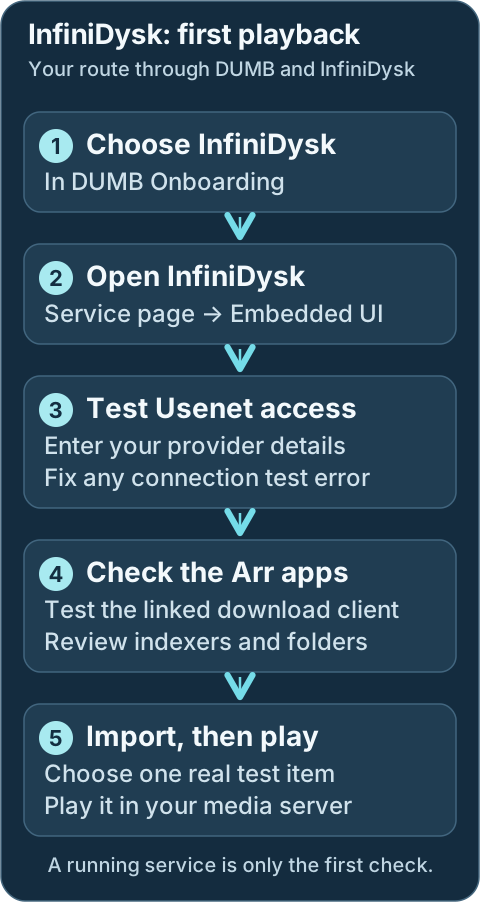
- In DUMB onboarding, choose InfiniDysk and the Arr applications and media server you want to use. To reopen onboarding, go to Settings → Launch Onboarding.
- Open the InfiniDysk service card. On DUMB Config, use Start if it is stopped, then select Embedded UI to open InfiniDysk.
- Add your Usenet provider account in InfiniDysk and test it. Keep the total connections used by all your apps within the provider's account limit.
- Open each selected Arr service's Embedded UI. Check Settings → Download Clients for InfiniDysk and test the connection. Check Settings → Indexers too; add and test an indexer directly or through Prowlarr.
- In the Arr application's Settings → Media Management → Root Folders, review the library folder DUMB created. Use that same curated folder in your media server. The normal InfiniDysk-only base is
/mnt/debrid/infinidysk-symlinks; combined workflows can use another base, so use the saved folder rather than guessing. - Add one intended movie or episode, watch the Arr queue through import, then scan the media library and play it. If a step fails, fix that connection or path before adding more requests.
DUMB completing startup means the application is running. A successful import and playback confirm that the full workflow is ready.
Existing NzbDAV installations should read Migration from NzbDAV before changing names or paths.
Development update · not in the released 2.23.0 docs
Setup checklist and remaining work
Choose intended Arr instances and provider accounts in the setup checklist. Other selected Usenet clients can reference InfiniDysk's accounts with separate connection allocations. Review the shared limit, add/test indexers, verify mount access and test a real import. Runtime readiness and Arr connections are separate results.
Requires the backend setup-arrangement capability. See Setup checklist and automation for retained tasks, coverage and safe retries.
The account-sharing and automatic connection steps above describe generation 1. Generation 2 uses the guarded native wizard for installation/migration and mount selection. Refresh the setup plan afterward; native account/provider, Arr-link and import-strategy work remains manual where no generation 2 adapter is advertised. Native FUSE excludes the associated rclone dependency while preserving the existing consumer path.
Support the maintainer
If InfiniDysk is useful to your stack, you can support the maintainer through Buy Me a Coffee. DUMB also exposes this link through the frontend's InfiniDysk service page and Settings → About.
Workflow diagram
Geek details: how requests, providers, mounts and libraries connect
%%{ init: { "flowchart": { "curve": "basis" } } }%%
flowchart TD
    A([Request Sources:<br/>Seerr, Trakt,<br/>Plex Watchlist,<br/>NeutArr])
    B[Arr Services:<br/>Sonarr, Radarr,<br/>Lidarr,<br/>Whisparr]
    C[[Prowlarr / Indexers]]
    D[InfiniDysk]
    E@{shape: cloud, label: "Usenet Providers"}
    F[[Rclone]]
    G[(WebDAV Mount Root:<br/>/mnt/debrid/<br/>infinidysk)]
    H[(QBit Download Symlinks:<br/>/mnt/debrid/infinidysk/<br/>completed-symlinks)]
    I[Arr Rename + Link Step:<br/>Hard Link / Symlink]
    J[(Final Symlink Root:<br/>/mnt/debrid/<br/>infinidysk-symlinks)]
    K([Media Servers:<br/>Plex, Jellyfin,<br/>Emby])

    E === D
    D === F
    linkStyle 0 stroke:transparent,stroke-width:0;
    linkStyle 1 stroke:transparent,stroke-width:0;

    A ==> B
    C <==> B
    B <==> D
    D e1@==> E
    F e2@==> D
    F e3@==> G
    D ==> H
    H ==> G
    H ==> B
    B ==> I
    I ==> J
    J e4@==> G
    K e5@<==> J


    classDef animate stroke-dasharray: 9,5,stroke-dashoffset: 900,animation: dash 25s linear infinite;
    class e1,e2,e3,e4,e5 animate
Service Relationships
Sonarr and Radarr find and request media through your indexers. InfiniDysk accesses it through your Usenet account. Your media server plays the organized library. DUMB starts the supporting mount service when required.
Geek details: service classification and runtime dependencies
| Classification | Role |
|---|---|
| Core Service | NZB WebDAV gateway |
| Mount | rclone |
| Optional | Sonarr, Radarr, Lidarr, Whisparr, Prowlarr, NeutArr |
| Exposes UI | Yes (Web UI + WebDAV) |
Development update · not in the released 2.23.0 docs
Generation 2 also offers native FUSE as an explicit mount choice in its guarded wizard.
What InfiniDysk provides
Use InfiniDysk's Embedded UI to manage providers, review its queue and check progress. DUMB connects the Arr applications you selected. For AIOStreams playback, use the separate setup steps below.
Geek details: HTTP listeners, WebDAV transport and Arr compatibility
| Endpoint | Purpose | Default |
|---|---|---|
| Web UI + WebDAV | Primary UI and WebDAV endpoint | http://<host>:3000/ |
| Backend API | Internal API for DUMB automation | http://127.0.0.1:8080/ |
InfiniDysk also exposes a Usenet download client path in Arr by emulating a Sabnzbd-compatible API. DUMB registers this client automatically when core_service: infinidysk (or core_service includes infinidysk) is set on Arr instances.
WebDAV endpoint
InfiniDysk 1.x has separate frontend and backend listeners. Managed rclone uses the internal backend WebDAV endpoint; the frontend can proxy WebDAV for clients. Keep existing external stream origins reachable.
WebDAV credentials
If webdav_password is blank, DUMB generates one at startup and stores it in the config.
Change the password before exposing InfiniDysk outside your trusted network.
Protect API keys
FRONTEND_BACKEND_API_KEY grants backend access. Treat it like a secret and avoid committing it to source control.
Technical details: configuration reference
Configuration in dumb_config.json
DUMB defaults to InfiniDysk
DUMB installs and updates the renamed project from
infinidysk/infinidysk by
default. The legacy nzbdav DUMB service key and NZBDAV_* environment
variables remain compatibility aliases. Existing configs containing either
former DUMB repository default, nzbdav-dev/nzbdav or nzbdav/nzbdav,
follow the maintained repository automatically; intentional custom forks
remain unchanged. User-visible identity changes remain opt-in.
Development update · not in the released 2.23.0 docs
Supported InfiniDysk versions
runtime_generation: "1" remains the default. Its latest and prerelease
channels stay on official InfiniDysk 1.x; selecting a 2.x release through
the 1.x release, branch or commit fields is refused. Named 1.x refs must
belong to the upstream v1 maintenance line before installation.
Generation 2 is an explicit opt-in through the separate wizard and requires
DUMB API 2.24.0 or newer plus the advertised protocol 1 capabilities. This
integration currently accepts only the verified v2.0.0-beta.6 native
artifact. It does not fall back to a source build or silently replace 1.x.
Existing data requires a guarded major migration; changing the generation
field does not convert a database. See the
upgrade guide for eligibility,
mount choices and current containment limitations.
{
"infinidysk": {
    "enabled": false,
    "process_name": "InfiniDysk",
    "repo_owner": "infinidysk",
    "repo_name": "infinidysk",
    "release_version_enabled": false,
    "release_version": "latest",
    "commit_sha": "",
    "branch_enabled": false,
    "branch": "main",
    "suppress_logging": false,
    "log_level": "INFO",
    "frontend_port": 3000,
    "backend_port": 8080,
    "postgres_enabled": false,
    "postgres_database": "infinidysk",
    "auto_update": false,
    "auto_update_interval": 24,
    "auto_update_start_time": "04:00",
    "symlink_backup_enabled": false,
    "symlink_backup_interval": 168,
    "symlink_backup_start_time": "04:00",
    "symlink_backup_path": "/config/symlink-repair/snapshots/infinidysk-{timestamp}.json",
    "symlink_backup_include_broken": true,
    "symlink_backup_retention_count": 1,
    "symlink_backup_roots": [
        "/mnt/debrid/infinidysk-symlinks"
    ],
    "clear_on_update": false,
    "exclude_dirs": [],
    "platforms": [
        "pnpm",
        "dotnet"
    ],
    "command": [],
    "config_dir": "/infinidysk",
    "log_file": "/log/infinidysk.log",
    "webdav_password": "",
    "env": {}
}
}
Key configuration fields
enabled: Toggle to run InfiniDysk via DUMB.frontend_port: Port for the Web UI and WebDAV endpoint.backend_port: Port for the backend API.postgres_enabled: Use DUMB-managed PostgreSQL for InfiniDysk's main operational database on a fresh InfiniDysk v1.2.0-or-newer installation or after a successful guarded DUMB cutover. The migration adapter accepts an official stable v1.2.0-or-newer runtime only while its SQLite and staged PostgreSQL schemas exactly match DUMB's supported database contract. SQLite remains the default. Leave this disabled on an existing SQLite installation until the migration panel completes cutover.postgres_database: Managed PostgreSQL database name. The default isinfinidysk.commit_sha: Optional full 40-character GitHub SHA. When set, DUMB builds that exact InfiniDysk revision instead of selecting a release or branch. After PostgreSQL cutover, the commit must equal or descend from the recorded cutover commit; the same ancestry rule applies to resolved release tags and branch heads.webdav_password: Default WebDAV password (overridden byWEBDAV_PASSWORD).config_dir: Path where InfiniDysk data is stored.log_file: Path for the consolidated InfiniDysk log.env: Optional environment variables (see below).
Development update · not in the released 2.23.0 docs
Generation 2 configuration
The wizard prepares these fields after reviewing an eligible fresh installation or retaining the original 1.x data and recovery state:
| Field | Purpose |
|---|---|
runtime_generation |
"1" by default; the guarded workflow selects "2" |
mount_backend |
rclone by default, or explicit native fuse |
mount_path |
Exact consumer-visible mount path; existing paths are preserved |
v2_runtime_dir |
Native program directory, normally /opt/infinidysk-v2 |
v2_data_dir |
Separate generation 2 data; blank resolves beneath data_root as infinidysk-v2 |
v2_release_version |
Verified native release, currently v2.0.0-beta.6 |
The 1.x source selection is retained for rollback. Its branch and commit selectors
are inactive on the prepared native runtime. Do not reuse postgres_enabled or
the 1.x DATABASE_PROVIDER/DATABASE_CONNECTION_STRING variables for generation 2;
use its separate native database conversion.
InfiniDysk 2 opens at a dedicated root URL. The frontend does not embed its UI
under /ui/infinidysk unless a validated adapter is explicitly advertised.
Use the service page's direct local address or configured public portal.
When DUMB retains a distinct 1.x backend port for generation 2 clients, its compatibility relay requires native Required authentication. DUMB applies a runtime lock, preserving the saved native setting and rejecting conflicting mode overrides. See the compatibility authentication policy before changing listener ports or native authentication.
PostgreSQL in InfiniDysk v1.2.0+
SQLite remains the default. Fresh compatible 1.x installs can select PostgreSQL for the main database; existing SQLite installs must use Database Migration and pass rehearsal before cutover. The helper stores stay local and still need filesystem backups.
Read the InfiniDysk 1 PostgreSQL procedure for supported schema contracts, source-version safeguards, backups, and rollback limits. Complete any NzbDAV identity or namespace migration first.
Guarded migration checklist
Back up independently, run preflight and rehearsal, review cutover, then validate the UI, queues, WebDAV, Arr connections, and playback. Follow the full checklist; a provider toggle does not migrate data.
Tracking a moving InfiniDysk release tag
A moving tag resolves to an immutable source commit for installation. With automatic updates disabled, a healthy installed runtime stays in place at restart. See release-tag selection.
Prebuilt archives and automatic source fallback
DUMB tries a verified matching prebuilt archive before source fallback. See archive verification and source selection.
Pinning an exact InfiniDysk commit
An exact source pin uses a full commit SHA. Review pinning and its update behavior before changing a running service.
Source-build update safety
Candidate builds and data preservation are documented in the source-build update guide.
Environment Variables
LOG_LEVEL: Logging level for InfiniDysk (defaults toINFO).WEBDAV_USER: Override the WebDAV username (defaults toadmin).WEBDAV_PASSWORD: Override the WebDAV password.CONFIG_PATH: Override the InfiniDysk config path (defaults toconfig_dir).FRONTEND_BACKEND_API_KEY: Backend API key shared with the frontend. DUMB generates and saves it when missing, then preserves it across configure runs and configuration reloads.ASPNETCORE_URLS: Backend bind address (defaults tohttp://+:<backend_port>).PORT: Frontend port (defaults tofrontend_port).BACKEND_URL: Frontend-to-backend URL (defaults tohttp://127.0.0.1:<backend_port>).
The frontend/backend key and the API key shown in InfiniDysk's settings may differ; upstream accepts both. If a running instance rejects DUMB's configured key with HTTP 401, DUMB can retry once using the API key from that instance's active database. This does not rotate the saved frontend/backend key or fall back to a retained SQLite database when PostgreSQL is active.
Integration with DUMB
DUMB maintains the selected Arr connections and library folders. Review those connections in each Arr application after setup; provider accounts, indexers and a real import still need your checks.
Geek details: automatic Arr connections and database storage
When InfiniDysk starts, DUMB performs several automation steps:
- Syncs Arr instance details into the InfiniDysk database
- Ensures API categories exist for Arr integrations
- Creates
/mnt/debrid/infinidysk-symlinks/<category>roots - Updates Arr permissions and root folders
- Adds or updates a download client named
InfiniDyskin Arr
The Arr instance list is stored under arr.instances in InfiniDysk's main
operational database/config store (SQLite by default, or PostgreSQL on a fresh
opted-in installation), so DUMB can merge user edits with auto-detected instances.
Startup timing
If the InfiniDysk backend is not reachable yet, DUMB retries the download-client setup shortly after startup.
AIOStreams playback
AIOStreams currently calls the canonical InfiniDysk integration NzbDAV. In AIOStreams, add NzbDAV, then provide:
- URL: InfiniDysk's direct local frontend/API listener, normally
http://127.0.0.1:3000; use the saved port if DUMB reassigned it. - API key: The key shown in InfiniDysk's SABnzbd settings.
- WebDAV username/password: Dedicated credentials from InfiniDysk's WebDAV settings.
- Public URL: Prefer leaving this blank and supplying an AIOStreams auth credential (
username:password) whose user has Proxy permission. Alternatively, enter a separately published trusted HTTPS InfiniDysk origin that the player can reach.
Do not use /ui/infinidysk for either URL. It is dmbdb's embedded operator route, not InfiniDysk's direct service address or a player-facing origin.
Database migration startup
If the UI shows Database maintenance in progress, wait and watch its steps and elapsed time. Large databases can take time. After a successful migration the page reloads into InfiniDysk. If it reports failure, review Service Logs and the migration troubleshooting guide before repeatedly restarting.
Geek details: startup ordering and migration failure behavior
DUMB starts the InfiniDysk frontend before running the blocking database migration. This is the default launch behavior and lets the Web UI show InfiniDysk's live Database maintenance in progress page, including migration steps, progress, and elapsed time, even when a large database takes a long time to migrate.
After a successful migration, DUMB starts the normal backend and the page reloads into InfiniDysk when it becomes healthy. If migration fails, DUMB keeps the frontend alive through InfiniDysk's brief failure-display window, then stops it and exits the InfiniDysk process with the migration's non-zero exit code. No separate setting is required.
Geek details: manual workflow selection and rclone configuration
Arr core_service setting
For Sonarr/Radarr/Lidarr/Whisparr instances you want wired to InfiniDysk, set
core_service to infinidysk or include it in a list:
This tells DUMB to auto-configure Arr integration around InfiniDysk’s WebDAV and download-client workflows.
See Core Service Routing for how core_service affects automation.
1. rclone WebDAV Mount
Create a dedicated rclone instance for InfiniDysk and point it at the WebDAV endpoint:
Technical details: configuration example
{
"rclone": {
  "instances": {
    "InfiniDysk": {
      "enabled": true,
      "core_service": "infinidysk",
      "process_name": "rclone w/ InfiniDysk",
      "suppress_logging": false,
      "log_level": "INFO",
      "key_type": "InfiniDysk",
      "zurg_enabled": false,
      "decypharr_enabled": false,
      "mount_dir": "/mnt/debrid",
      "mount_name": "infinidysk",
      "config_dir": "/config",
      "config_file": "/config/rclone.config",
      "log_file": "/log/rclone_w_infinidysk.log",
      "zurg_config_file": "",
      "cache_dir": "/cache",
      "command": [],
      "api_key": ""
    }
  }
}
}
When key_type is set to InfiniDysk, DUMB configures rclone to use:
http://127.0.0.1:<backend_port>/as the internal generation 1 WebDAV URLWEBDAV_USER/WEBDAV_PASSWORD(or the values stored in the InfiniDysk DB)- an rclone RC listener on the first available port starting at
5572
DUMB reserves RC ports already assigned to other managed rclone instances and
AltMount, and also checks active listeners before selecting the port. On first
setup, DUMB enables Settings -> Rclone Server in InfiniDysk and points it at the
local RC listener so WebDAV changes can invalidate rclone's VFS directory cache.
Later InfiniDysk UI changes to the RC enablement, host, username, or password are
preserved. A saved --rc-addr and --dir-cache-time in the rclone command are
also retained when they remain valid.
Development update · not in the released 2.23.0 docs
For generation 2, the WebDAV transport uses its consolidated HTTP listener and
native Basic login. Its mount can remain rclone or explicitly use native FUSE.
Generation 2 does not send the 1.x rclone RC directory-refresh notifications, so
its rclone setup uses a shorter directory-cache policy and retains --links for
.rclonelink handling. Native FUSE does not use rclone flags or the optimizer.
The optimizer described below currently supports generation 1; generation 2
needs a separately advertised and validated native adapter, even when it keeps rclone.
Default rclone mount path (if not overridden) is:
Streaming optimization
If Rclone Optimizer is available on InfiniDysk's associated rclone service page, open it there to choose content, run measurements and review a report. Apply or roll back the suggested rclone settings from that same page. InfiniDysk can show a link to an active test.
The test uses your Usenet account and real provider traffic. Read Rclone Streaming Optimizer, including its traffic and concurrency requirements, before starting.
Geek details: optimizer capability and measurement sources
When the backend advertises rclone_optimizer_infinidysk, open the dedicated
InfiniDysk-backed rclone service page and select Rclone Optimizer. The primary
job indicator, content picker, live measurements, report, apply, and rollback
controls belong to rclone because those are rclone settings. The InfiniDysk page only
shows a contextual link while an associated rclone test is active.
The test does pull content through InfiniDysk's authenticated WebDAV server and the configured Usenet providers. It also consumes InfiniDysk Overview and stream-trace API data while rclone RC and DUMB host metrics describe the mount and system side. Review Rclone Streaming Optimizer before testing, especially the provider traffic and concurrency limits.
Geek details: manual Arr configuration and category mapping
2. Arr Integration (Sonarr/Radarr)
Set core_service to infinidysk (or include infinidysk in a list) for the Sonarr and
Radarr instances you want wired to InfiniDysk:
{
"sonarr": {
  "instances": {
    "Default": {
      "enabled": true,
      "core_service": "infinidysk",
      "port": 8989
    }
  }
},
"radarr": {
  "instances": {
    "Default": {
      "enabled": true,
      "core_service": "infinidysk",
      "port": 7878
    }
  }
}
}
DUMB will:
- Create symlink roots at
/mnt/debrid/infinidysk-symlinks/<category> - Configure InfiniDysk to recognize these paths
- Update Arr permissions (enable chmod + set folder/file modes)
- Attempt to add an
infinidyskdownload client in the Arrs using their API keys
When core_service includes both decypharr and infinidysk, the root folder base
shifts to /mnt/debrid/combined_symlinks/<category>. Other multi-service
combinations keep the InfiniDysk symlink root unless another workflow owns its own
root-folder setup.
Automatic vs manual wiring
When core_service is set to infinidysk (or includes it), DUMB
automatically configures download clients, root folders, and permissions.
If core_service includes both decypharr and infinidysk, the Arr root folder
base switches to /mnt/debrid/combined_symlinks/<category>.
Manual setup is only needed when core_service is blank or you want to override
the combined workflow wiring.
Category mapping
By default, DUMB maps Arr types to categories:
| Arr service | Default category |
|---|---|
| Radarr | movies |
| Sonarr | tv |
| Lidarr | music |
| Whisparr | whisparr |
Instance names are slugified into categories if present (for example, Radarr 4K becomes radarr-4k).
Accessing the UI
Open the service from DUMB's Embedded UI tab when available. The native URLs below require the corresponding Docker host port to be published; use the port saved in your running configuration.
- Navigate to:
http://<host>:<frontend_port>(default port3000) - WebDAV endpoint:
http://<host>:<frontend_port>/
Port conflicts and auto-shift
InfiniDysk defaults (3000/8080) overlap with Riven defaults. DUMB can auto-shift
conflicting ports at container startup or during the onboarding core-service
start flow, updating dumb_config.json accordingly.
Per-service stop/start/restart does not re-run port conflict resolution, so fix
conflicts manually before restarting a single service.
Troubleshooting Tips
| Symptom | Start here |
|---|---|
| Port opens but DUMB still shows Starting | Migration readiness |
| Throughput or startup latency changes | Performance evidence |
| Lock errors, growing WAL, or slow database probes | SQLite pressure |
| Authentication or install/update failure | Troubleshooting guide |
InfiniDysk starts but its port is already open
A migration status responder can accept connections before the native backend is ready. Check health and migration progress before restarting.
Compare InfiniDysk performance
Use AI Assist performance evidence and correlate playback timing separately.
Assess SQLite pressure
Identify the affected main or helper store before changing database providers. See database-health checks.
Migration from NzbDAV
Existing NzbDAV installations keep their identity and paths until you choose a migration. Fresh InfiniDysk installations do not need it. Read the complete migration procedure before starting: it covers independent backups, preflight, downtime, automatic rollback, and recovery.
After the full migration succeeds
Verify native service health, Arr/Prowlarr connections, updated library paths, and representative playback before restoring automatic trash/deletion behavior. DUMB does not launch library scans for you. Follow the post-migration checklist.
Finalize the migration and remove recovery data
Recovery-data cleanup is optional and irreversible. Keep the rollback bundle until validation and an observation period are complete. Review the cleanup scope and confirmation steps before purging it.