Auto-restart#
DUMB includes an automatic restart system that monitors service health and restarts failed services to maintain system stability without manual intervention.
Overview#
The auto-restart system provides:
- Health monitoring - Periodic health checks for each service
- Automatic recovery - Restart services that become unhealthy
- Exponential backoff - Increasing delays between restart attempts
- Restart limits - Prevent infinite restart loops
- Grace periods - Allow services time to initialize
- Startup lifecycle gating - Do not restart services while the stack is still assembling
- Verified recovery - Count success only after the restarted service is healthy

How it works#
%%{ init: { "flowchart": { "curve": "basis" } } }%%
flowchart TD
    A([Service running])
    B{Health check}
    C{Threshold exceeded?}
    D{Restart limit reached?}
    E[Restart service]
    F([Stop retrying])
    G[Wait grace period]

    A ==> B
    B -- Healthy --> A
    B -- Unhealthy --> C
    C -- No --> B
    C -- Yes --> D
    D -- Not reached --> E
    D -- Reached --> F
    E ==> G
G ==> B- Startup gate - Monitoring waits until DUMB startup is
readyordegraded - Grace period - Each service receives its configured post-start grace
- Health check - DUMB verifies the process, configured ports, and—where a safe local endpoint exists—the application itself
- Unhealthy detection - Multiple consecutive failures trigger action
- Restart attempt - Service is stopped and restarted
- Recovery verification - Success is recorded only after health checks pass
- Repeat - Continue monitoring after restart
Health states and application probes#
DUMB reports four application health states:
| State | Meaning | Auto-restart behavior |
|---|---|---|
| Healthy | Process, ports, and application probe passed | Reset the consecutive-failure counter |
| Degraded | The application is reachable but reports a warning, or an optional probe is unsupported/protected | Keep the service running and show the reason |
| Starting | The application explicitly reports initialization or migration work | Keep waiting; do not count it as an Auto-restart failure |
| Unhealthy | The process/port failed or the application endpoint reports a real failure | Count toward unhealthy_threshold |
Application probes are bounded, read-only, loopback requests cached briefly by the backend. Current probes include:
- InfiniDysk backend
/health - Servarr
/pingfor Sonarr, Radarr, Lidarr, Prowlarr, and Whisparr - Jellyfin
/health, Emby application ping, and Plex/identity - Seerr status and Traefik Proxy Admin health
- PostgreSQL
pg_isreadyand pgAdmin ping - rclone's local RC version endpoint when RC is enabled
Services without a known safe application endpoint retain process and port checks. DUMB deliberately does not use content health, missing articles, indexer/provider warnings, or other external-integration checks as restart signals. Those conditions may require operator action, but restarting a healthy application usually does not fix them and can create a restart loop.
For InfiniDysk specifically, the maintained fork can keep its backend port open
during a blocking database migration while /health returns
503 {"status":"migrating"}. DUMB reports this as Starting, so stack
readiness waits for the real backend without repeatedly restarting a legitimate
migration.
Configuration#
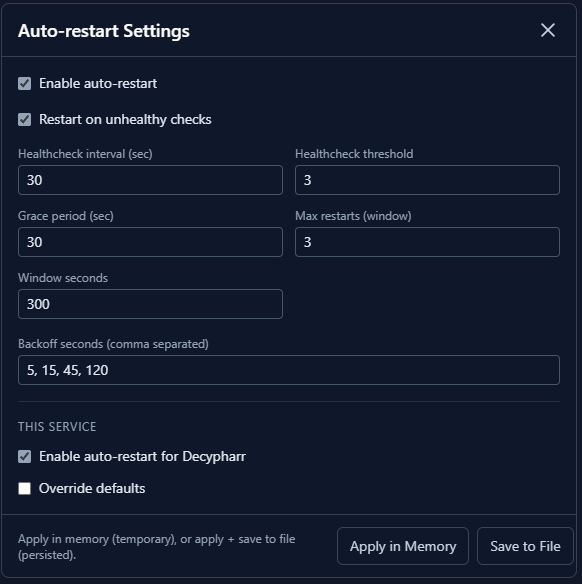
Auto-restart is configured globally in dumb.auto_restart:
"dumb": {
  "auto_restart": {
    "enabled": false,
    "restart_on_unhealthy": true,
    "healthcheck_interval": 30,
    "unhealthy_threshold": 3,
    "max_restarts": 3,
    "window_seconds": 300,
    "backoff_seconds": [5, 15, 45, 120],
    "grace_period_seconds": 30,
    "services": []
  }
}
Configuration options#
| Option | Default | Description |
|---|---|---|
enabled |
false |
Enable auto-restart globally |
restart_on_unhealthy |
true |
Restart when health checks fail |
healthcheck_interval |
30 |
Seconds between health checks |
unhealthy_threshold |
3 |
Consecutive failures before restart |
max_restarts |
3 |
Maximum restarts within the window |
window_seconds |
300 |
Time window in seconds |
backoff_seconds |
[5, 15, 45, 120] |
Backoff delays between restarts |
grace_period_seconds |
30 |
Seconds to wait after stack readiness or a later service launch before health checks |
services |
[] |
Limit auto-restart to these process names |
Backoff schedule#
To prevent rapid restart loops, DUMB selects delays from the configured
backoff_seconds list:
| Attempt | Delay |
|---|---|
| 1 | 5 seconds |
| 2 | 15 seconds |
| 3 | 45 seconds |
| 4+ | 120 seconds |
This is an explicit list, not a calculated multiplier. You can replace it with any ordered list of non-negative delays. Attempts beyond the list use its last value.
Restart limits#
Services have a maximum number of restart attempts within a time window:
- Default: 3 restart attempts in a rolling 300-second window
- After reaching the limit, additional automatic attempts are suppressed while those attempts remain inside the window
- Old attempts age out of the rolling window automatically
- A manual start re-enables monitoring after an intentional stop, but does not erase the recorded rolling-window attempts
Restart limit reached
If a service keeps failing, investigate the root cause rather than increasing limits. Check logs for error messages.
Health checks#
For each explicitly selected service, DUMB verifies:
- the tracked PID still exists and is not a zombie; and
- each configured
port,frontend_port,backend_port, orwebdav_port(including corresponding values inenv) accepts a TCP connection.
There is no standalone health_check object in the current config. Add a
service to dumb.auto_restart.services; its entry may inherit all global values
or override selected policy fields:
"services": [
  {
    "process_name": "Riven Backend",
    "enabled": true,
    "unhealthy_threshold": 4,
    "grace_period_seconds": 60
  }
]
An empty services list monitors no services even when the global enabled
flag is true. Use exact process names from GET /process/processes or select
services in the frontend panel.
Slow applications can use a longer service override without delaying checks
for the rest of the stack. A 300-second override is a reasonable starting point
for a Seerr instance that performs migrations or a first-run frontend build.
The stack-wide readiness deadline is configured separately under
dumb.startup; see Startup lifecycle.
Monitoring restart status#
Dashboard indicators#
The dashboard shows auto-restart status for each service:
- Restart count - Number of restarts in current window
- Last restart - Timestamp of most recent restart
- Health status - Current healthy/unhealthy state
API endpoints#
Query restart status via the API:
# Get service status including restart info
curl 'http://localhost:3005/api/process/service-status?process_name=Riven%20Backend&include_health=true'
Response includes:
{
  "process_name": "Riven Backend",
  "status": "running",
  "healthy": true,
  "health_status": "healthy",
  "health_reason": null,
  "health_details": {
    "probe": "process_and_ports",
    "ports": [8080]
  },
  "restart": {
    "restart_attempts": 2,
    "restart_successes": 2,
    "restart_failures": 0,
    "recent_restart_attempts": 2,
    "pending": false,
    "next_restart_time": null,
    "disabled": false,
    "last_restart_time": 1736937000.0,
    "last_failure_reason": null,
    "last_exit_time": 1736936995.0,
    "last_exit_reason": "Port 127.0.0.1:8080 not responding",
    "unhealthy_count": 0,
    "unhealthy_threshold": 3
  }
}
WebSocket updates#
Real-time restart events via /ws/status:
{
  "type": "status",
  "processes": [
    {
      "process_name": "Riven Backend",
      "status": "running",
      "healthy": true,
      "restart": {
        "restart_attempts": 2,
        "restart_successes": 2,
        "restart_failures": 0,
        "recent_restart_attempts": 2,
        "pending": false,
        "next_restart_time": null,
        "disabled": false,
        "last_restart_time": 1736937000.0,
        "last_failure_reason": null,
        "last_exit_time": 1736936995.0,
        "last_exit_reason": "Port 127.0.0.1:8080 not responding",
        "unhealthy_count": 0,
        "unhealthy_threshold": 3
      }
    }
  ]
}
Disabling auto-restart#
Per-service#
Remove a service from the monitored list, or retain an explicit disabled entry:
"services": [
  {
    "process_name": "Riven Backend",
    "enabled": false
  }
]
Globally#
To disable auto-restart for all services, set dumb.auto_restart.enabled to
false, or use the frontend panel. Per-service entries may remain stored for a
later re-enable.
Best practices#
Appropriate thresholds#
- Critical services (Plex, rclone): Lower threshold (2-3)
- Background services (Zilean, NeutArr): Higher threshold (3-5)
Grace periods#
- Fast-starting services: 10-15 seconds
- Database-dependent services: 30-60 seconds
- Services with startup tasks: 60-120 seconds
Monitoring#
- Review restart counts regularly
- Investigate services with frequent restarts
- Check logs after restart events
Troubleshooting#
Service keeps restarting#
- Check service logs for errors
- Verify configuration is valid
- Ensure dependencies are running
- Check for port conflicts
Auto-restart not working#
- Verify
auto_restart.enabledistrue - Confirm the exact process name is present and enabled in
auto_restart.services - Check whether the restart limit was reached
- Confirm the configured service port is accurate and reachable on container loopback
Restart delay too long#
- Shorten the values in
backoff_seconds - Review
max_restartsandwindow_secondsbefore changing limits - Fix the underlying health failure instead of using a zero-delay retry loop
Related pages#
- Dashboard - View restart status
- Process Management API - API controls
- WebSocket API - Real-time updates